WOWK12

Introduction to AI · Grades 6–8

Make after school a place to create with AI.

Give middle school students a reason to say, ‘Look what I made.’ WOWK12 helps after-school organizations run a 16-lesson introduction to AI through game customization, AI artwork, and personal websites. Students learn by making choices, testing ideas, and sharing what they discover.

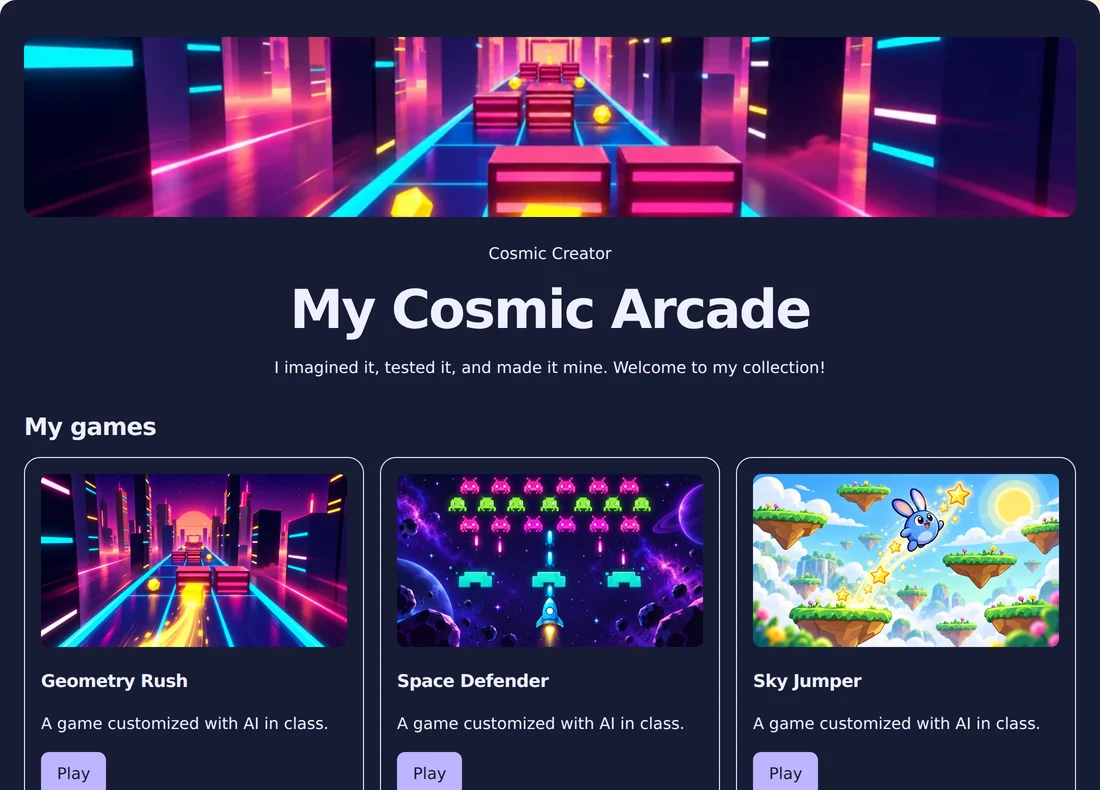
Sample finished student website with colorful game thumbnails and AI artwork
Illustrative sample project, not an actual student’s work.

A shared sequence with room for individual ideas

The course follows four chapters: Looks, Behaviors, Rules, and Design. Each lesson brings a different game and a focused AI concept. Students can give projects their own look and supported settings while working through a common learning experience. The sequence builds toward a final project and WOW Expo.

Plan around your program’s schedule

Lessons are designed for 60–90 minutes. When planning an after-school club or enrichment program, discuss how the 16 sessions fit your calendar, attendance pattern, and available staff. English and Spanish materials are available, and beginners do not need coding experience.

Keep the practical setup clear

The student workspace runs in a browser, including on Chromebooks. Plan internet access, student devices, adult supervision, and time for testing and discussion. Authorized adults manage section access. Students sign in with school-managed credentials while their teacher keeps class open.

Give families something students can explain

Projects make learning visible, but the conversation matters too. Students practice describing what they changed, what happened, and how AI helped. Use the final showcase to celebrate their choices, evidence, and creative credit. Review sharing permissions with your school or organization before displaying student work.

Before you begin

Questions from program leaders

Is this designed for after-school organizations?

Yes. WOWK12 welcomes middle school clubs, school enrichment courses, and after-school programs. A demo helps determine the schedule, staffing, access, and pricing for your group.

What do students create?

Students customize games, create AI artwork, and build a personal website across the course. They work toward a final project and WOW Expo.

How do we get started?

Book a demo and share your grade levels, expected group size, available devices, and program calendar. The team can walk through the experience and planning details.

Let’s talk about your group.

Share your grade levels, calendar, and program goals. We’ll walk through the course and the next steps with you.